

Microsoft 365 Security: Quick Takeaway
Microsoft 365 security is now as critical as the platform itself across Saudi Arabia’s enterprise and public sector. Teams, Outlook, SharePoint, and OneDrive carry the communication and decisions that run organisations. Most IT departments have completed the deployment. Far fewer have secured it.
The distinction matters now more than ever. The NCA ECC 2-2024 framework became binding for all private sector organisations in January 2026. It explicitly requires identity controls, email protection, and privileged access governance. For organisations running Microsoft 365, every one of those requirements maps directly to a configuration decision inside the tenant.
This article covers the account security gaps that consistently appear in Saudi enterprise Microsoft 365 environments, and the steps that close them.
- Microsoft 365 is not secure by default. Deployment without configuration leaves accounts exposed across email, Teams, and SharePoint.
- MFA is now mandatory for Microsoft 365 admin portals as of February 2026. It blocks over 99% of account compromise attacks.
- Overprivileged accounts with standing Global Admin access are among the most exploited entry points in enterprise tenants.
- Defender for Office 365 requires active configuration. Default settings do not protect against executive impersonation or supplier email compromise.
- Microsoft Secure Score provides a free baseline that maps directly to NCA ECC 2.0 control requirements for Saudi organisations.
Microsoft 365 Security: Why a Live Tenant Is Not a Secure One
Microsoft 365 offers strong built-in security, but a single misconfigured setting can expose your environment. The platform catches obvious threats by default. However, it does not cover targeted attacks, legacy protocol abuse, or overprivileged accounts.
Saudi organisations face specific pressure here. A large share of Microsoft 365 deployments in the Kingdom accelerated after 2020. Speed was the primary objective. Security hardening was scheduled for later. In many cases, that later phase never arrived. As a result, many tenants are fully operational but insufficiently protected.
Microsoft 365 Security Starts Here: MFA and Conditional Access
Stolen credentials remain the most common way attackers get in. Without MFA, a leaked password is a free pass into the tenant. Moreover, Microsoft confirms that MFA blocks over 99% of account compromise attacks.
Since February 9, 2026, Microsoft requires MFA for all access to the Microsoft 365 admin center. A single compromised password, without MFA, gives attackers unrestricted access to email, files, identity controls, and audit logs.
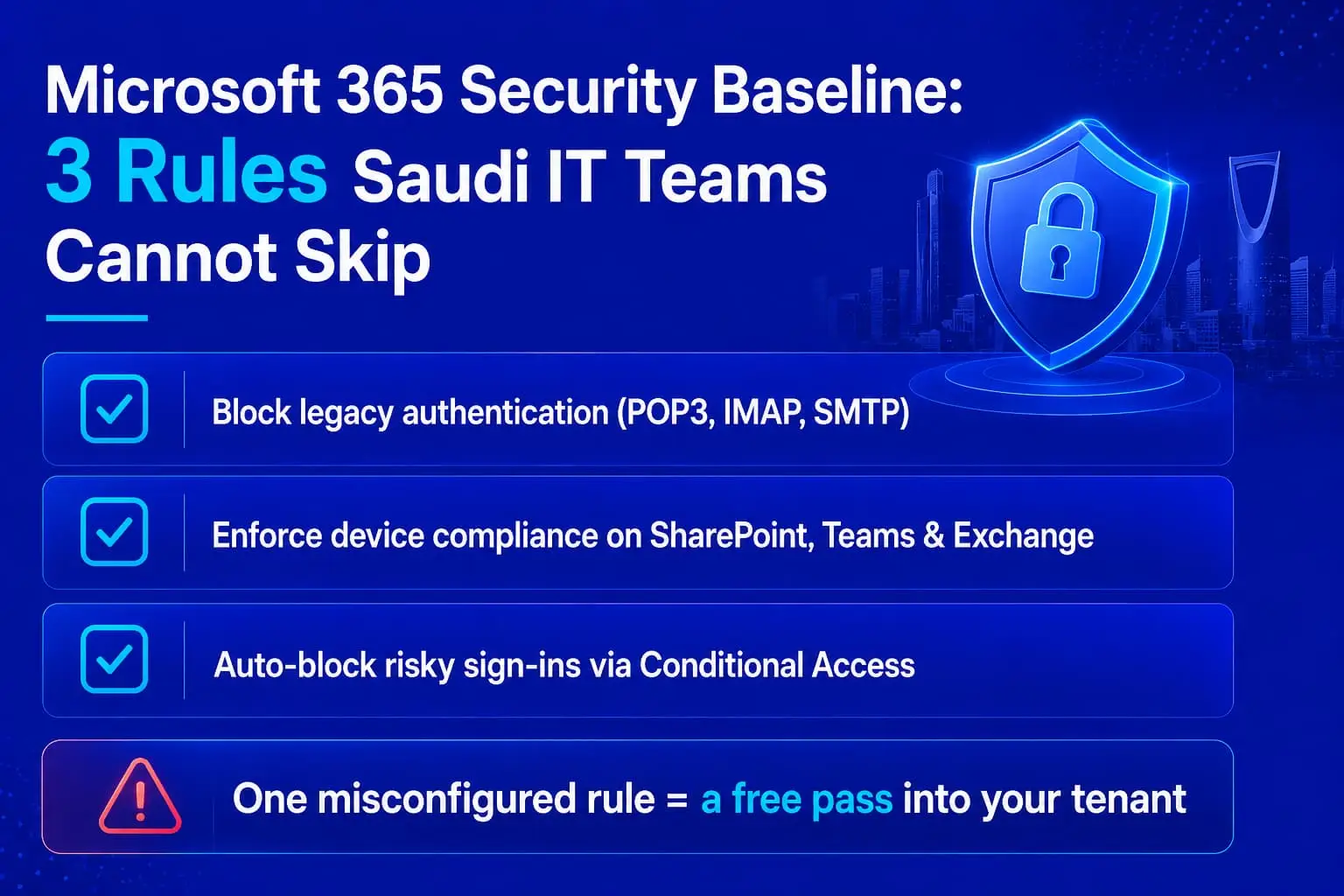
Enforcing MFA for administrators is the minimum. Additionally, a properly configured posture extends that requirement to all users through Conditional Access policies. Three rules Saudi IT teams should treat as baseline:
Block legacy authentication protocols. POP3, IMAP, and SMTP do not support modern authentication. Consequently, attackers can use them to bypass MFA entirely. Block them via Conditional Access unless a specific, scoped exception exists.
Enforce device compliance. SharePoint, Exchange Online, and Teams should only be accessible from managed, compliant devices.
Flag and block risky sign-ins. Microsoft Entra ID detects impossible travel, logins from malicious IPs, and anomalous sign-in patterns. In addition, these risk signals should trigger automatic MFA challenges or access blocks. A policy that only generates reports is not doing its job.
Microsoft 365 Security Risk: The Global Admin Problem Saudi IT Teams Underestimate
Tenants with 15 to 30 Global Admins are routine. Every GA account is a high-value target. If one account is compromised, the entire tenant is at risk. Additionally, using a GA account for daily tasks like checking email increases the likelihood of phishing success.
The fix is Privileged Identity Management (PIM), available in Microsoft Entra ID P2. PIM converts standing admin access into just-in-time elevation. An administrator requests a role, the team logs the justification, the system grants access for a defined window, and it expires automatically. Therefore, the permanent Global Admin count should sit between two and four accounts, reserved for break-glass scenarios only.
For Saudi organisations under NCA ECC 2.0, Control 3-3 requires exactly this kind of auditable, time-limited access model.
Microsoft 365 Email Security: What the Defaults Do Not Cover
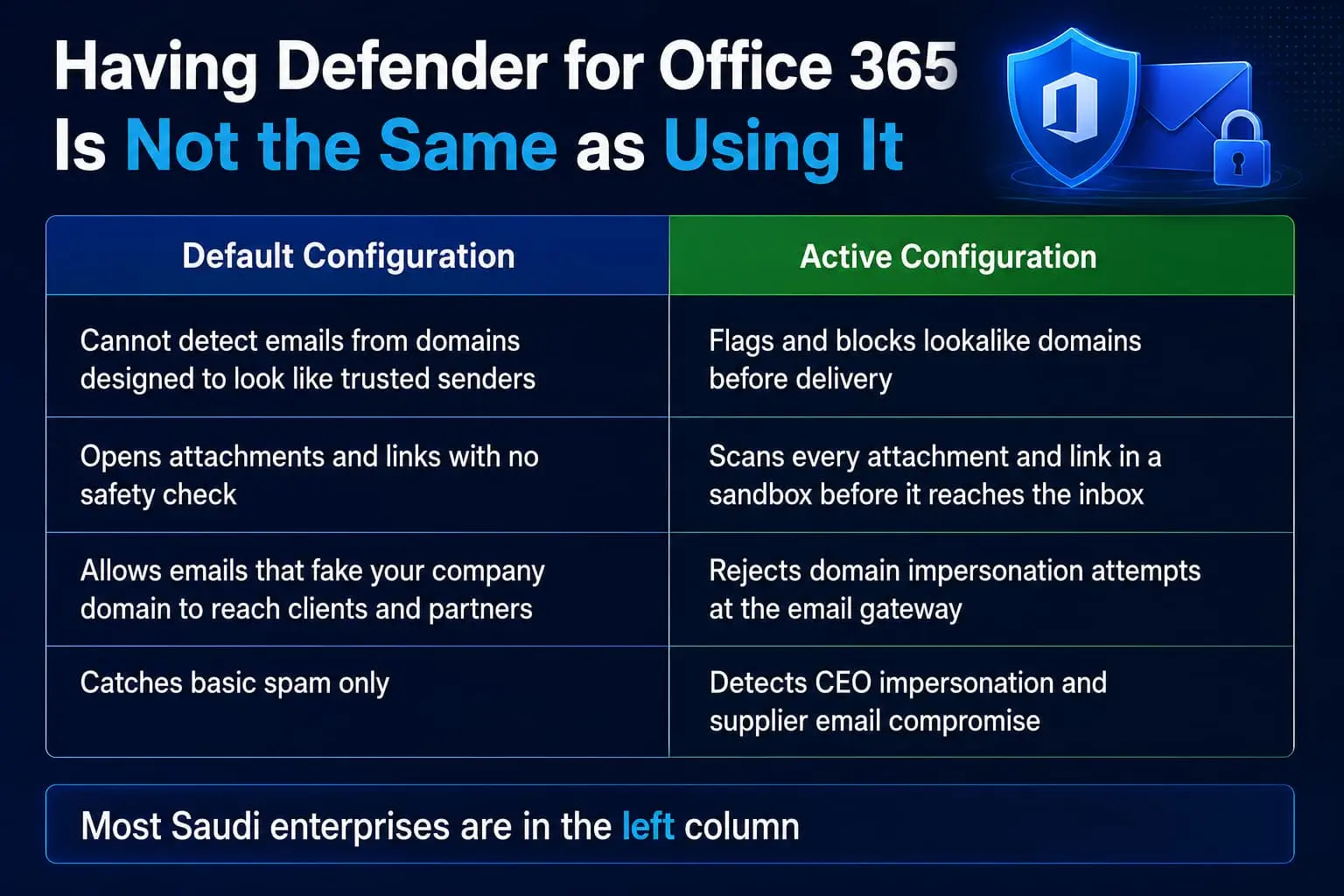
Email remains the primary attack vector in Saudi enterprise environments, with business email compromise and executive impersonation among the most reported incident types. Microsoft Defender for Office 365 is the primary email and collaboration security solution for Microsoft 365, providing protection against phishing, business email compromise, and zero-day malware in attachments and links across email, Teams, SharePoint, and OneDrive.
The issue is not whether organisations have the license. The most common pattern is that Defender for Office 365 is deployed but sitting in default configuration. Default anti-phishing settings catch obvious threats. Targeted attacks, including impersonation of your CEO, lookalike domains, and supplier compromise, slip through. The protections have to be actively turned on and tuned.
Critical configurations that cannot be left at defaults:
- Safe Links and Safe Attachments: rewrites and detonates URLs and files before delivery to users
- Anti-impersonation policies: covering executive names, registered domains, and key supplier addresses
- Email authentication records: SPF, DKIM, and DMARC to prevent domain spoofing and protect your brand from being used in phishing campaigns against your own partners and clients
These configurations map directly to NCA ECC 2.0 Control 2-4 on email security and to SAMA CSF email protection controls.
Microsoft 365 Security Blind Spots: What Defender for Identity Detects
Microsoft Defender for Identity monitors Active Directory and Entra ID for behavioural anomalies that standard logging does not surface. Specifically, it detects lateral movement, abnormal privilege escalation, credential harvesting, and unusual administrative actions.
Defender for Identity also includes an identity risk score from 0 to 100. This score indicates the likelihood of compromise based on account criticality and privileged roles. Security teams can use it to prioritise which accounts need attention before an incident occurs.
For Saudi organisations running hybrid environments, Defender for Identity closes the visibility gap between on-premises Active Directory and cloud-based access. This is particularly relevant where legacy AD infrastructure remains in production alongside Microsoft 365.
Microsoft Secure Score: A Compliance Baseline That Auditors Can Verify
Microsoft Secure Score tracks your tenant’s posture against a continuously updated set of recommendations. Each recommendation is scored, prioritised by impact, and linked to implementation guidance.
For Saudi IT teams preparing for NCA ECC 2.0 audits, Secure Score functions as a working compliance baseline. Controls 3-1 and 3-3 map directly to recommendations around MFA coverage, admin role reduction, and Conditional Access deployment. Furthermore, reviewing Secure Score monthly and tracking improvement produces documented evidence that auditors and internal risk committees increasingly expect.
Where Alnafitha Comes In
Knowing what needs to be configured is one thing. Executing it correctly across a live production tenant, without disrupting users or creating access gaps, is a different challenge entirely.
Alnafitha’s Microsoft Security and Compliance practice covers the full Microsoft 365 security configuration cycle for Saudi organisations: Entra ID hardening, Conditional Access policy design, Defender for Office 365 tuning, Defender for Identity deployment, PIM implementation, and Secure Score baseline assessment, all aligned to NCA ECC 2.0 audit requirements.
As a Microsoft Country Partner of the Year 2025 in Saudi Arabia, Alnafitha brings both the technical depth and the local compliance context that generic implementation guides cannot provide. The team has worked across government, financial services, energy, and private sector organisations in KSA, and understands the specific configurations that Saudi regulators assess during NCA and SAMA audits.
For organisations that have deployed Microsoft 365 but have not conducted a structured security review, Alnafitha’s Modern Collaboration and Security engagements include a Secure Score review and gap closure roadmap as the starting point.
Closing the Gap
Microsoft 365 security is not a product you purchase. It is a configuration you maintain. Organisations that experience account compromise and data exfiltration are rarely running different software. They are running the same software with different configuration decisions.
NCA ECC 2.0, SAMA CSF, and PDPL create a compliance obligation around identity, email, access governance, and data protection. If your organisation has not conducted a structured security review, the gap between your current posture and what your audit requires is almost certainly larger than your last assessment suggested.
Request a Free Microsoft 365 Security Score Review from Alnafitha
Frequently Asked Questions
What are the most common Microsoft 365 security gaps in Saudi enterprises?
The most consistently observed gaps are: MFA not enforced for all users, legacy authentication protocols left active, excessive Global Admin accounts with standing access, and Defender for Office 365 running on defaults. Each represents a direct NCA ECC 2.0 control requirement.
How does Microsoft 365 security align with NCA ECC 2.0 compliance in Saudi Arabia?
Control 3-1 covers identity and access management, Control 3-3 covers privileged access, and Control 2-4 covers email security. All three map directly to Microsoft 365 configurations: Entra ID and Conditional Access for identity, PIM for privileged access, and Defender for Office 365 for email. Microsoft Secure Score documents compliance posture for auditors.
What is Microsoft Secure Score and why does it matter for Saudi IT teams?
It is a free, continuously updated dashboard that scores your tenant’s security posture and prioritises improvement recommendations. For Saudi IT teams, it serves as a working compliance baseline for NCA ECC 2.0 and SAMA CSF, providing documented evidence for audit purposes.
How do you configure multi-factor authentication for Microsoft 365 accounts?
MFA is configured through Microsoft Entra ID using Conditional Access policies. These policies allow context-aware enforcement based on device compliance, location, and risk level. For privileged accounts, phishing-resistant methods such as FIDO2 keys should replace SMS-based verification. Since February 2026, Microsoft enforces MFA for all admin portal access.
Are there managed security service providers specialising in Microsoft 365 security in Saudi Arabia?
Yes. Alnafitha IT is Microsoft Country Partner of the Year 2025 in Saudi Arabia. The company specialises in Microsoft 365 security configuration, NCA ECC 2.0 compliance alignment, and managed security support for Saudi enterprise and public sector organisations.